

Guide
Wednesday, March 25, 2026
Retrieving Data from the Software Heritage S3 Graph Dataset Using Amazon Athena

Software is a critical component of modern scientific and technological progress, encapsulating both practical expertise and accumulated knowledge. Preserving software is therefore essential not only to safeguard innovation but also to ensure continued access to the tools and methods that underpin research and discovery. Achieving this requires coordinated community efforts. Software Heritage is one initiative that provides common foundations for heritage preservation, science, and industry.
In this blog, we perform a step-by-step traversal of the Software Heritage Graph Dataset using Amazon Athena to produce a filtered, deduplicated set of GitHub README content hashes. We then walk through retrieving the selected content into a local AWS S3 bucket within a controlled environment. Working with an archive at this scale is inherently challenging, but a structured traversal combined with practical query orchestration enables a systematic and reproducible workflow. Finally, a brief cost breakdown for each stage of the pipeline will be provided.
These results will be further developed and implemented in Phase II and the final phase of the Data Sharing Index (“S-Index”) Challenge of National Institutes of Health. If you want the full working stack to follow along or reuse, check out the fairdataihub/s-index repository.
Mission of Software Heritage
For more than a decade, the Software Heritage initiative has led one of the most comprehensive efforts to archive and preserve publicly available source code worldwide. Its mission is to systematically collect, safeguard, and provide long-term access to the global software commons, ensuring that research software and open-source contributions remain discoverable, citable, and reusable over time. Today, the archive contains billions of source files spanning millions of repositories across diverse ecosystems, captured as a fully deduplicated Merkle DAG and stored in Apache Parquet format through public S3 buckets, forming a structured and queryable archive measured in terabytes. Beyond its scale, the archive’s strength lies in its graph-based structure: rather than traditional repository folders, Software Heritage models software as interconnected tables where every object is hash-addressed and deduplicated. While this architecture enables reproducibility at scale, retrieving specific data requires understanding the graph traversal path, as described in the following paragraphs.
Prerequisites
Before we get started, you'll need to make sure you have access to the following:
- An AWS account with an IAM user or role
- Correct permissions attached to your IAM user or role
Set up AWS S3 bucket
- Create (or confirm) an S3 bucket for Athena outputs
aws s3 mb s3://<your-bucket-name> --region us-east-1
- Verify that your IAM role or user has the required S3 permissions for Athena result storage:
  athena:StartQueryExecution, athena:GetQueryExecution, athena:GetQueryResults, athena:StopQueryExecution
  glue:GetTable, glue:GetDatabase, glue:GetPartitions
  s3:PutObject, s3:GetObject, s3:ListBucket
Step 1. Accessing the Software Heritage Graph
We begin by defining an external table in Amazon Athena pointing to the Software Heritage Graph snapshot dated 2025-10-08, stored as Parquet files on S3, in order to query the origin data.
CREATE EXTERNAL TABLE IF NOT EXISTS swh_graph_2025_10_08.origin (
    id STRING,
    url STRING
)
STORED AS PARQUET
LOCATION 's3://softwareheritage/graph/2025-10-08/origin/';
Once the external tables are defined in Athena, our initial objective is to retrieve repository URLs, visit dates, and SHA-1 identifiers. To achieve this, it is necessary to understand the structure of the Software Heritage (SWH) graph schema, a simplified representation of which is shown below:
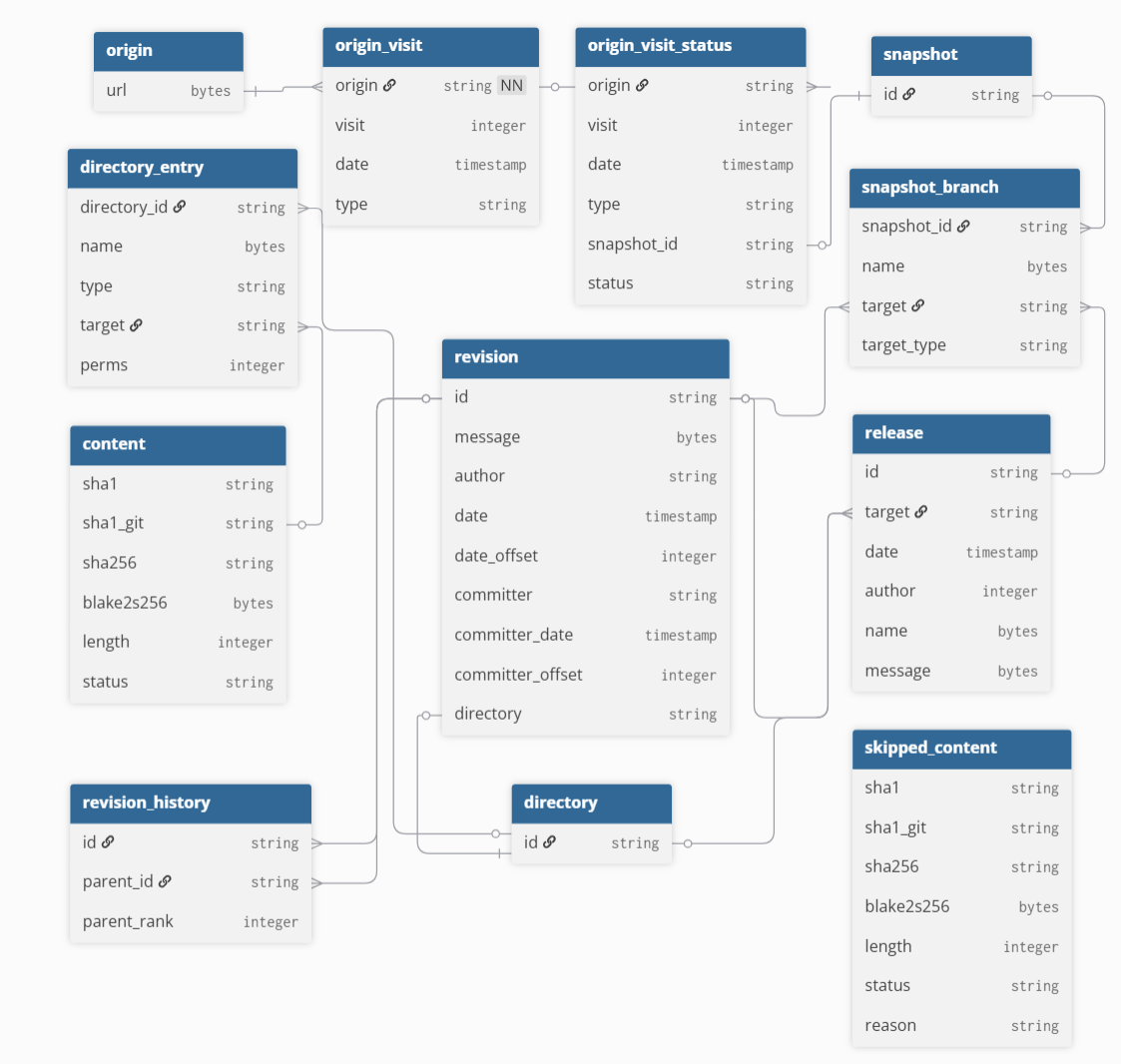
An initial attempt might look like joining six tables as shown below:
-- Initial attempt: single-pass join (exceeded resource limits)
SELECT o.url, ovs.date AS visit_date, c.sha1 AS content_sha1
FROM swh_graph_2025_10_08.origin o
JOIN swh_graph_2025_10_08.origin_visit_status ovs ON o.url = ovs.origin
JOIN swh_graph_2025_10_08.snapshot_branch sb ON ovs.snapshot = sb.snapshot_id
JOIN swh_graph_2025_10_08.revision r ON sb.target = r.id
JOIN swh_graph_2025_10_08.directory_entry de ON r.directory = de.directory_id
JOIN swh_graph_2025_10_08.content c ON de.target = c.sha1_git
WHERE sb.target_type = 'revision' AND de.type = 'file';
This query exceeded Athena’s execution limits due to the enormous size of the underlying tables and the unpartitioned nature of the SWH Graph dataset. In addition, Athena lacks traditional indexing capabilities for efficient join optimization. As a result, joining multiple large unpartitioned tables significantly increases scan and shuffle costs, making a single full join impractical. More detailed information about the structure and design of the SWH dataset can be found in the corresponding Software Heritage article.
Consequently, in order to obtain the SHA-1 identifiers, we adopt a stepwise strategy: each table is saved locally as an intermediate table, and the joins are performed incrementally.
Step 2. Extracting Repository URLs and Visit Data
We start with the origin table to retrieve all repository URLs, obtaining approximately 400 million URLs. We then stage intermediate results to progressively narrow the working set. Subsequently, from the origin_visit_status table, we extract approximately 3 billion records corresponding to repository visits, each representing a crawl attempt and its associated snapshot.
CREATE TABLE default.url_and_date AS
SELECT
    o.url,
    ovs.date AS visit_date
FROM swh_graph_2025_10_08.origin o
JOIN swh_graph_2025_10_08.origin_visit_status ovs
    ON o.url = ovs.origin;
Using these dates, we then retrieve the snapshot identifiers:
CREATE TABLE default.url_date_snapshot_2a AS
SELECT
   u.url,
   u.visit_date,
   ovs.snapshot as snapshot_id
FROM default.url_and_date u
JOIN swh_graph_2025_10_08.origin_visit_status ovs
   ON u.url = ovs.origin
   AND u.visit_date = ovs.date
WHERE ovs.snapshot IS NOT NULL;
Step 3. Linking Snapshots to Revisions and Directories
After obtaining the snapshot IDs, this attempt to export the snapshot_branch table locally exceeded Athena’s service limits. Therefore, we constrained the query to retrieve only the main and master branches, which in most repositories correspond to the principal development lines. This reduces the data volume while preserving the core revision history relevant to our analysis, although repositories whose primary development branch uses a different name may be under-represented.
CREATE TABLE default.snapshot_branch_filtered AS
SELECT
    snapshot_id,
    target AS revision_id
FROM swh_graph_2025_10_08.snapshot_branch
WHERE target_type = 'revision'
  AND (
      name = CAST('refs/heads/main' AS VARBINARY)
      OR name = CAST('refs/heads/master' AS VARBINARY)
  );
After filtering, we then obtain snapshot branches, and revision tables.
CREATE TABLE default.url_date_branch_2b AS
SELECT
   u.url,
   u.visit_date,
   sf.revision_id
FROM default.url_date_snapshot_2a u
JOIN default.snapshot_branch_filtered sf
   ON u.snapshot_id = sf.snapshot_id;


CREATE TABLE default.url_date_rev_2c AS
SELECT
   b.url,
   b.visit_date,
   r.directory as directory_id
FROM default.url_date_branch_2b b
JOIN swh_graph_2025_10_08.revision r
   ON b.revision_id = r.id;
Step 4: Extracting README Entries
Once we obtain the necessary foreign key to proceed, we move to one of the largest tables in the Software Heritage database. This is the most computationally intensive step, scanning approximately 24 TB of data. To avoid timeouts and resource limit errors, we restrict our query to retrieve only four specific README file types—README.md, readme.md, README, and README.txt—by matching their corresponding hexadecimal filename encodings.
CREATE TABLE default.directory_entry_readme AS
SELECT
    directory_id,
    target AS content_sha1_git
FROM swh_graph_2025_10_08.directory_entry
WHERE type = 'file'
  AND name IN (
      X'524541444D452E6D64',
      X'726561646D652E6D64',
      X'524541444D45',
      X'524541444D452E747874'
  );
Step 5. Resolving Git SHA-1 to Canonical SHA-1
Once we retrieve the directory-level sha1_git values, we decompose the query into three incremental steps. First, we extract the distinct content_sha1_git values from the intermediate result set. Next, we join this reduced set against the content table to retrieve only the matching SHA1_git and SHA1 pairs. Finally, we perform the join between the original URL/date dataset and the filtered content results.
By materializing intermediate tables and reducing the join cardinality at each stage, we are able to avoid exhaustion errors and complete the retrieval successfully.
CREATE TABLE default.url_date_directory_sha_3b AS
SELECT
    u.url,
    u.visit_date,
    d.content_sha1_git
FROM default.url_date_rev_2c u
JOIN default.directory_entry_readme d
    ON u.directory_id = d.directory_id;


CREATE TABLE default.filtered_directory_sha1 AS
SELECT DISTINCT content_sha1_git
FROM default.url_date_directory_sha_3b;
CREATE TABLE default.content_matched AS
SELECT c.sha1_git, c.sha1
FROM swh_graph_2025_10_08.content c
JOIN default.filtered_directory_sha1 f
   ON c.sha1_git = f.content_sha1_git;


CREATE TABLE default.url_content_final AS
SELECT d.url, d.visit_date, d.content_sha1_git, cm.sha1
FROM default.url_date_directory_sha_3b d
JOIN default.content_matched cm
   ON d.content_sha1_git = cm.sha1_git;
By following the steps above, we retrieved over 450 million GitHub repository records and stored their URLs, visit dates, and SHA-1 identifiers in a local table.
Step 6. Deduplicating Repositories
We then filter the URLs so that each appears only once, retaining a single record per repository. The most recent visit date is selected for each URL, with MAX_BY ensuring the associated content hash corresponds to that latest snapshot.
CREATE TABLE default.filtered_github_total_table AS
SELECT url, content_sha1_git, sha1, visit_date
FROM url_content_final
WHERE url LIKE 'https://github.com/%';

CREATE TABLE default.filtered_github_unique AS
SELECT
   url,
   MAX_BY(content_sha1_git, visit_date) AS content_sha1_git,
   MAX(visit_date) AS visit_date
FROM default.filtered_github_total_table
GROUP BY url;
As a result, the dataset is reduced to approximately 225 million rows. After excluding records with empty sha1_git values, the final dataset contained approximately 223 million rows.
Computational Cost Breakdown Across Processing Steps
Due to the large scale of the Software Heritage (SWH) dataset, processing can be costly. Amazon Athena charges $5 per terabyte of data scanned, and while the SWH dataset itself is publicly hosted at no storage cost, any intermediate tables created during processing are stored in your own S3 bucket and incur standard storage fees (~$0.023 per GB/month). In this work, the approximate cost breakdown for each step is presented in the table below.
| Step | Stage Description | Data Scanned | Cost (USD) |
|---|---|---|---|
| 1 | Accessing SWH via Athena | Minimal | Minimal |
| 2 | Extracting URLs and Visit Data | ~660 GB | ~$3.30 |
| 3 | Linking Snapshots to Revisions | ~1.84 TB | ~$9.20 |
| 4 | Extracting README Entries | ~26 TB | ~$130.00 |
| 5 | Resolving Git SHA-1 to Canonical SHA-1 | ~1.4 TB | ~$7.00 |
| 6 | GitHub Filtering and Deduplication | Minimal | Minimal |
Although working with materialized local tables improved performance, operations involving the largest SWH tables remained expensive. In particular, Step 4 was the most demanding stage, as the directory_entry table is among the largest in the dataset, making it the most computationally intensive and costly component of the workflow.
Results
After navigating the dataset through a sequence of queries, where each query gradually revealed the next segment of the route, we arrived at the intended result: a consolidated table containing 223 million records of unique GitHub URLs, their corresponding visit dates, the associated sha1_git revision identifiers, and the SHA-1 hashes of their README contents. An example of the result is shown below:
| URL | SHA1 codes of README files | Date |
|---|---|---|
| https://github.com/nygim/pyfairdatatools | 0eca1c249f00956b9264403e9ecd8fb90ac5b428 | 2025-08-30 16:04:36 |
| https://github.com/fairdataihub/fairshare | 8964359b0597187a29028955ecc3845dfcf86173 | 2025-07-29 12:26:33 |
| https://github.com/megasanjay/fairdataihub.org | 458585c7c8b579e4547d445cb49d496b1be1ba19 | 2023-08-19 21:50:20 |
| https://github.com/fairdataihub/SODA-for-SPARC-Docs | 47acbdb4c775d1bb5bbd127fde9287211eee504c | 2025-10-06 11:55:02 |
Conclusion
This guide demonstrated a practical workflow for extracting README content hashes from the Software Heritage Graph Dataset using Amazon Athena. By materializing intermediate tables and breaking large joins into manageable steps, we were able to navigate scale constraints and build a focused dataset. The resulting collection of GitHub URLs and SHA-1 hashes supports downstream tasks such as DOI mining and software citation analysis, illustrating how structured traversal enables effective exploration of large archival datasets.